
Launchpad is streamlined and more compact

The Scanz Launchpad has been redesigned with a compact layout, grouped scanners, a new Toolbox section, and a horizontal mode to maximize your screen real estate.

You’ll notice a brand new Launchpad that packs a much bigger punch! In order to accommodate exciting new features we will be releasing soon, we had to redesign the Launchpad. It is now much more compact, takes up less space, and contains more options.

All of the scanners have been grouped into a new Scanners category.
launchpad_1 - Trading platform screenshot

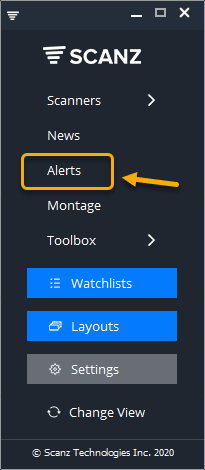
Notifications have been renamed Alerts. We feel the name Alerts represents this feature much better.
launchpad_2 - Trading platform screenshot

The new Toolbox section contains your core non-scanning features such as Charts, Level 2, Prints (Time & Sales), and our new Market Internals.
launchpad_3 - Trading platform screenshot

The Launchpad can now be set to “horizontal” mode to take up even less space. Just click on the “Change View” icon to change it from vertical to horizontal and back again.
launchpad_4 - Trading platform screenshot

update

Toolbar has been optimized

The Scanz window toolbar is redesigned with a compact menu offering save as default, clone window, export to Excel, hide top panel, and snapshot options.

Read
update

Charts have been improved

Scanz charts get a major navigation overhaul: left-aligned controls, improved indicators menu, new Preferences panel with extended hours and crosshair options.

Read
update

News now has 100% real-time quote data!

Scanz News Scanner now streams 100% real-time Level 1 quote data alongside headlines, giving traders a decisive edge when reacting to news-driven stock moves.

Read